CRM data integrity is what separates a CRM your team trusts from one they quietly avoid.
When the integrity of data slips, everything gets harder: email bounces rise, territories become messy, reports contradict each other, and teams waste hours checking whether a phone number, job title or company record is still right.
For go-to-market teams, the pressure is even greater. Buyers change roles, companies restructure, new markets open and old CRM records decay quickly.
That’s why data integrity needs ongoing CRM hygiene, clear ownership and reliable CRM data integrity tools that help teams clean, verify and enrich records before bad data hurts revenue.
This blog explores everything you need to know about the topic.
What is data integrity?
Data integrity is the accuracy, completeness, consistency and reliability of data throughout its lifecycle. In a CRM context, it means the information your team uses to sell, market and report is fit for purpose.
That includes data points such as:
- Contact names
- Job titles
- Email addresses
- Phone numbers
- Company names
- Industries
- Locations
- Employee headcount
- Revenue bands
- CRM ownership
- Lead status
- Buying committee information
- Account history
In plain English, CRM data integrity is the confidence that the information in your CRM reflects reality.
If a sales rep opens a record and sees the right decision-maker, a verified phone number, a current company name and a relevant industry, that’s strong CRM data integrity.
If they see three duplicate contacts, a bounced email, an old job title and a missing phone number, that’s a data integrity problem.
It’s also worth separating data integrity from data quality. They’re closely linked, but not identical:
-
Data quality is about whether the data is useful, accurate, and complete enough for the task.
-
Data integrity is about preserving the trustworthiness and structure of that data as it’s collected, stored, updated, moved and used.
High-quality data helps teams perform today. Strong CRM data integrity helps keep that data reliable as your market, systems and workflows change.
The importance of CRM data integrity
The importance of data integrity becomes clear when you consider how many teams rely on your CRM:
-
B2B sales use it to prioritise accounts, plan outreach, track the pipeline, and follow up with buyers.
-
B2B Marketing use it for segmentation, personalisation, lead scoring and campaign reporting.
-
RevOps uses it to manage territories, attribution, routing, and forecasting.
- Customer success uses it to understand account context, identify risk and spot expansion opportunities.
When CRM data integrity is strong, every team works from the same source of truth. When it isn’t, each team starts creating its own workaround.
That’s when the trouble begins.
For example, sales reps may build private spreadsheets because they don’t trust contact records. Marketing may suppress large parts of the database because email quality is too poor. RevOps may spend hours reconciling reports that should already align. Leadership may make decisions based on dashboards that appear precise but are built on unreliable data.
The benefits of data integrity are practical and measurable. Clean, well-maintained CRM data helps teams:
- Reach the right buyers faster
- Reduce wasted outreach to invalid or irrelevant contacts
- Improve email deliverability by removing bad addresses
- Segment audiences more accurately
- Personalise messaging by role, industry, region or company size
- Improve sales forecasting
- Reduce duplicate work
- Increase CRM adoption because users trust the system
- Support compliance by keeping records more accurate and controlled
- Improve customer experience by giving teams better context
The real benefit? Better decisions.
A CRM doesn’t need to be perfect to be valuable. But it does need to be trusted. Once users stop trusting your CRM, they stop using it properly. And when they stop using it properly, data integrity gets worse.
It’s a frustrating flywheel, but it’s fixable with clear ownership, regular data hygiene, and trusted enrichment workflows.
What causes poor CRM data integrity?
Bad CRM data usually builds slowly. It’s rarely one catastrophic mistake. More often, it’s hundreds of tiny issues piling up until the CRM becomes difficult to trust.
Here are the most common causes:
1. Manual data entry
Manual entry is one of the biggest risks to data integrity.
A rep might enter a contact as “VP Sales”, while another uses “Vice President of Sales”. One team might use “United States”, another might use “USA”, and another might use “US”. A new lead might be created without checking whether the account already exists.
Each issue looks small on its own. Together, they make the CRM harder to use.
The fix is to reduce free-text entry where possible. Use required fields, picklists, validation rules and data enrichment workflows to standardise data before it spreads through the CRM.
This gives teams cleaner records from the start and reduces the manual clean-up work needed later.
2. Duplicate records
Duplicates are a classic CRM hygiene problem. They usually appear when multiple users create records for the same person or company, or when connected tools sync new data without matching it to existing records.
For example, a prospect might first enter the CRM through a webinar list. A few weeks later, an SDR creates the same person manually after finding them on LinkedIn. Then, a B2B data tool syncs another version of the record using a different company name or email format.
Now the activity history is split. One record shows campaign engagement. Another shows sales calls. A third is owned by a different rep.
No one has the full picture, so the account becomes harder to manage.
To fix this, you can use customer de-duplication software.
3. Outdated contact data
B2B data decays quickly because the market is always moving.
For example, a contact may enter your CRM as the right buyer for a priority account. Six months later, they’ve moved to another company, the business has been acquired, and the buying committee has changed. But if the CRM hasn’t been verified or enriched, sales still see the old record.
Which leads to wasted effort.
Regular CRM verification and enrichment prevent this decay from becoming part of everyday execution.
It helps teams keep job titles, phone numbers, company details and buying committee data current, so the CRM remains useful rather than quietly drifting away from reality.
Cognism not only ensures your data is always accurate, fresh, and compliant, but also provides CRM enrichment to keep it that way.

Digital Marketing Manager @Sparta Global

4. Missing fields
Missing data weakens segmentation, scoring, routing and reporting.
If industry, region, seniority, phone number or company size fields are incomplete, teams can’t confidently answer basic questions such as:
- Which accounts fit our ICP?
- Which contacts should sales prioritise?
- Which campaigns influenced pipeline?
- Which territories are undercovered?
- Which accounts need enrichment before outreach?
For example, marketing may want to build a campaign for enterprise finance accounts in the UK. If industry, region and company size fields are missing or inconsistent, the audience will either be too narrow, too broad or simply wrong.
Sales then receives leads without enough context to prioritise them properly. Some accounts may fit their ideal customer profile, but lack phone numbers or seniority data. Others may look like good prospects in the CRM but fall outside the target segment once firmographic data is filled in.
RevOps is left trying to explain why campaign performance, routing, and pipeline reports don’t align.
The fix is to define the minimum fields each workflow needs before a record can be used.
For B2B teams, that usually includes industry, region, company size, seniority, job title, phone number, email, account owner and lifecycle stage.
Records that fall below that standard should be enriched before they enter campaigns, routing logic, or sales sequences.
5. Poor CRM governance
Data integrity depends on process as much as technology.
For example, one sales team might create new contacts whenever they find a prospect. Marketing might import event lists without checking whether existing records already exist. RevOps might then find duplicate leads, missing required fields and inconsistent lifecycle stages across the CRM.
The issue isn’t intent. Each team is trying to move quickly. But without clear rules, every team makes different decisions about what should be created, updated, merged or archived.
Good CRM data governance should define:
- Who owns CRM data clean-up
- Which fields are mandatory
- What qualifies as a usable record
- How duplicates should be handled
- When records should be enriched
- When old records should be archived
- Which teams can edit key fields
A clear process prevents inconsistent behaviour. And consistent behaviour is what maintains CRM data integrity over time.
6. Disconnected systems
Most revenue teams rely on multiple platforms, and each handles customer data differently. If they don’t sync cleanly, the same account can start to look different depending on where a team checks.
For example, a contact might be marked as a customer in the CRM, a prospect in marketing automation and inactive in a sales engagement tool.
This creates confusion over which system should be trusted.
Strong CRM data integrity depends on clean integrations, clear field mappings and agreed rules for how data moves between systems.
That way, teams can work from a consistent view of each account and contact, rather than reconciling different versions of the same record.
How to improve CRM data integrity
Improving CRM data integrity means building a repeatable system to keep data clean, accurate, and useful.
Here’s where to start:
1. Define what “good CRM data” means
Before you clean CRM data, define what “clean” means for your business.
For example, your US sales team may rely on state data for territory routing. If one record says “California”, another says “CA”, and another says “Calif.”, the data may look accurate at first glance, but it won’t work reliably in segmentation, reporting or routing.
The same applies to job titles, industries, account ownership and lifecycle stages. Without agreed-upon standards, teams make their own formatting decisions, making your CRM harder to trust.
Set clear rules for:
- Required fields
- Accepted formats
- Naming conventions
- Job title normalisation
- Industry categories
- Country and state fields
- Account ownership
- Lead and lifecycle stages
- Duplicate handling
- Data source priority
This is the unglamorous work behind CRM data integrity, but it matters. Standards give sales, marketing and RevOps a shared definition of data quality before records are cleaned, enriched or used in revenue workflows.
2. Run a CRM data audit
A CRM data audit identifies where the biggest integrity issues lie and which are most likely to affect revenue.
Start by reviewing:
- Duplicate contacts and accounts
- Missing email addresses
- Invalid or bounced emails
- Missing phone numbers
- Outdated job titles
- Contacts at old companies
- Accounts without owners
- Inconsistent industry labels
- Incomplete firmographic data
- Records with no recent activity
- Fields no one uses
- Conflicting values across systems
Once you’ve reviewed the data, group issues by commercial impact. Prioritise the problems that affect revenue first, such as invalid emails, missing phone numbers, duplicate accounts and poor-fit records being routed to sales.
You can also use a customer data health score to make this process easier to manage.
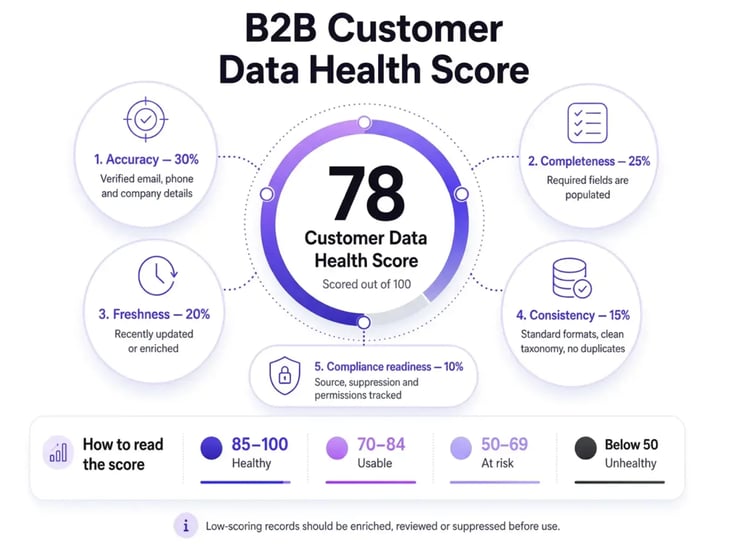
A customer data health score gives each record a rating based on factors such as completeness, accuracy, freshness, duplication risk and compliance readiness.
For example, a healthy account record might include a verified phone number, a valid email address, a current job title, complete firmographic data, a named owner and a recent enrichment date.
Records with a low score can then be routed for enrichment, review or suppression before they enter campaigns, sales sequences or forecasting reports.
This helps RevOps move from reactive clean-up to structured CRM data management. Instead of fixing issues record by record, teams can see which parts of the database need attention first and where poor data is most likely to damage GTM execution.
3. Prioritise CRM data cleansing
CRM data cleansing is the process of identifying, correcting, standardising and removing inaccurate or irrelevant records from your CRM.
This can include:
- Removing duplicates
- Updating outdated fields
- Standardising formats
- Correcting spelling errors
- Filling missing values
- Removing dead records
- Validating email addresses
- Confirming phone numbers
- Reassigning ownership
- Archiving records that no longer serve a purpose
You may also see this described as CRM data cleaning, CRM data clean-up or CRM cleanup. The terminology varies, but the purpose is the same: improving CRM data so sales, marketing and RevOps teams can trust the records they use every day.
A useful rule:
Don’t clean everything with equal urgency. Focus on the data your team actually uses to drive revenue.
Fields that support segmentation, prioritisation, routing, reporting, compliance or customer experience should be cleaned and maintained first. If a field doesn’t support any of those workflows, review whether it still needs to exist.
This keeps CRM data cleansing focused on commercial value rather than cosmetic tidiness.
And if you’re wondering how often you should do this, here’s a handy infographic.
.webp?width=717&height=850&name=crm-data-cleansing-times%20(1).webp)
4. Use CRM data verification
CRM data verification checks whether records are still accurate before teams rely on them.
This is especially important for fields such as:
- Business email
- Direct dial
- Mobile number
- Job title
- Company
- LinkedIn profile
- Company domain
- Location
- Seniority
- Department
Verification helps stop bad data from spreading through your CRM. It also protects teams from acting on stale information.
For example, if a contact has changed roles, verification can show whether they’re still relevant to the account, whether they should be linked to a new company or whether a different buyer should be prioritised.
You can also improve verification at the point of entry by using a trusted B2B data provider like Cognism.
Instead of relying only on manual checks after records have already entered the CRM, Cognism helps revenue teams work from accurate, compliant and current contact and company data from the start. This reduces the risk of invalid emails, outdated job titles, missing phone numbers and poor-fit records becoming part of your CRM infrastructure.
For larger teams, this matters because verification isn’t just about correcting individual records. It’s about protecting the quality of the data foundation used for segmentation, routing, forecasting, enrichment and AI-driven revenue workflows.
5. Enrich CRM records
CRM enrichment adds missing or updated information to existing records. It’s one of the most effective ways to improve CRM data integrity because it gives teams more complete, current and usable data.
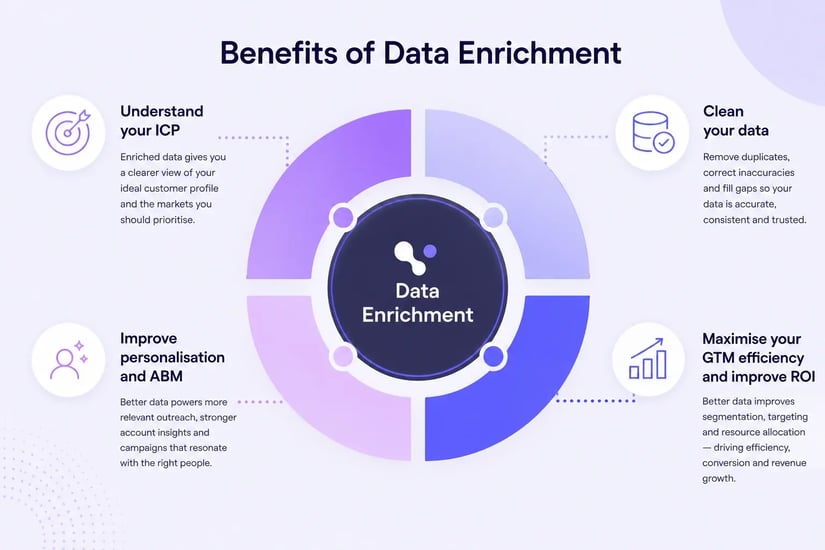
Enrichment can add or refresh:
- Verified emails
- Phone numbers
- Job titles
- Departments
- Seniority levels
- Company size
- Industry
- Revenue
- Location
- Technologies used
- Buying signals
- Account-level firmographics
This is where a trusted B2B data enrichment tool like Cognism can support the process.
Cognism CRM Enrichment helps revenue teams see exactly where their CRM data is breaking down. This includes missing contacts, outdated records and gaps across key personas. Teams can then fix those records with verified European B2B data and keep them up to date through governed workflows. Thanks to field-level rules, they can stay in control of what gets updated, what only fills blanks and what gets protected. For RevOps teams tired of inheriting someone else's data mess, it's built to take that off the plate permanently.
Instead of expecting reps or operations teams to manually search for missing details, enrichment updates CRM data at scale and provides sales, marketing and RevOps with cleaner records for segmentation, prioritisation, routing and reporting.
For GTM teams operating across markets like the UK and Europe, this is essential because account coverage depends on current roles, verified contact details, accurate regional data and complete firmographics. Without that foundation, teams can waste time pursuing stale leads, misroute valuable accounts or report on a market view that no longer reflects reality.
Strong enrichment provides revenue teams with a more reliable data layer for planning, execution, and decision-making.
Take a look at the Cognism platform:
6. Automate where possible
Manual CRM hygiene doesn’t scale well.
People get busy. Rules are applied inconsistently. Records decay between clean-up projects. Over time, the CRM drifts away from the market it’s meant to represent.
CRM data integrity tools can help automate the repetitive checks that keep records usable, including:
- Duplicate detection
- Email validation
- Field standardisation
- CRM data cleansing
- CRM data verification
- Data enrichment
- Account matching
- Lead-to-account mapping
- Workflow alerts
- Data quality scoring
- Migration checks
For example, an automated workflow might flag duplicate accounts before they enter the pipeline, validate email addresses before a campaign launches and enrich missing firmographic fields before leads are routed to sales.
That reduces the volume of manual cleanup and helps teams maintain CRM quality in everyday operations.
Automation still needs governance. Teams need clear rules for which fields matter, which systems should take priority and when a record should be reviewed rather than automatically changed.
The strongest setup combines automated checks with human judgement. Let systems handle the repeatable work, then ask RevOps, sales or marketing to review exceptions, edge cases and high-value records where context matters.
7. Assign CRM data ownership
Someone needs to own CRM data integrity.
That doesn’t mean one person fixes every record. It means there is clear accountability for the standards, processes, tools and reporting that keep CRM data reliable.
Ownership should cover:
- RevOps owns data standards, governance and reporting
- Sales managers ensure reps follow the agreed CRM processes
- Marketing Ops manages campaign, segmentation and attribution fields
- CRM admins maintain validation rules, permissions and data integrations
- Data owners reviewing quality reports and health scores each month
This shared model works because each team owns the data quality decisions closest to its workflows, while RevOps maintains the overall CRM governance model.
When ownership is vague, CRM data clean-up becomes everyone’s problem. In practice, that means it quickly becomes no one’s priority. Clear accountability gives CRM data integrity a place in the operating rhythm, rather than leaving it as an occasional clean-up project.
8. Train CRM users
Your CRM users need to know how to enter, update and manage data correctly.
Training should cover:
- Required fields
- Naming conventions
- When to create a new record
- How to check for duplicates
- How to update job changes
- How to log activity
- How to flag incorrect data
- Which fields matter most
- What shouldn’t go in free-text fields
Keep the training practical. Users don’t need a long theoretical session on field hygiene. They need to understand which behaviours protect CRM data integrity and how those behaviours help them work more effectively.
The best training connects clean data to commercial outcomes. Show teams how accurate CRM data helps them prioritise accounts, reduce admin, avoid wasted outreach and trust the system they’re expected to use.
Training also needs reinforcement. Build CRM data standards into onboarding, manager reviews and regular process refreshers. Otherwise, good practice becomes something people remember only after something breaks.
9. Monitor data quality continuously
CRM data integrity needs ongoing monitoring. Even strong records decay as people move roles, companies change, and systems sync new information.
Track CRM health using metrics such as:
- Percentage of records with missing required fields
- Duplicate rate
- Email bounce rate
- Records without owners
- Accounts without key firmographics
- Contacts with outdated job titles
- Records created without source data
- Data completeness by region or team
- CRM adoption and activity logging
- Enrichment match rate
- Average customer data health score
A customer data health score can make these metrics easier to manage. Instead of reviewing every issue separately, RevOps can score records based on completeness, accuracy, freshness, duplication risk and compliance readiness. Low-scoring records can then be prioritised for enrichment, suppression or manual review.
Set a clear review cadence. For example, RevOps might review data quality weekly, sales managers might review rep-level CRM hygiene monthly and leadership might review CRM integrity metrics quarterly.
This keeps CRM data quality visible in the operating rhythm of the business. It also helps teams spot problems before they affect segmentation, routing, forecasting, reporting or AI-driven workflows.
Ensuring data integrity during CRM migration
Ensuring data integrity during CRM migration deserves its own section because migrations are where old CRM problems often get copied into a shiny new system.
A migration gives revenue teams a chance to decide which data is worth keeping, which records need cleaning and which fields should be left behind.
Before migrating CRM data:
- Audit your existing database
- Remove duplicate records
- Archive irrelevant or inactive data
- Standardise field formats
- Validate email addresses and phone numbers
- Map fields between old and new systems
- Decide which system is the source of truth
- Test the migration with a sample dataset
- Check record relationships, such as contacts to accounts
- Enrich missing data before or after migration
Poor CRM data shouldn’t be migrated just because it exists. Moving unreliable records into a new system won’t make them more useful. It simply carries old data problems into a cleaner-looking environment.
Cognism CRM Enrichment can support this process before and after migration.
Before migration, Cognism can help verify key account and contact records, fill missing fields and improve data completeness where it matters most.
After migration, it can help refresh records in the new CRM so that sales, marketing, and RevOps teams start with more accurate, compliant, and complete B2B data.

Best CRM data integrity tools to consider
The right CRM data integrity tools depend on your GTM tech stack, data volume and go-to-market motion. Most teams need a mix of tools rather than one platform that does everything.
Useful categories include:
CRM enrichment tools
Lead enrichment tools add missing data and refresh stale records. They’re especially useful for improving contactability, segmentation, account prioritisation and reporting confidence.
Examples include:
- Cognism
- Clearbit (Breeze Intelligence)
- Demandbase
- Enricher.io
Cognism acts as a trusted B2B data layer, helping teams enrich CRM records with accurate, compliant contact and company data.
Data cleansing tools
Data cleansing tools help identify inaccurate, incomplete or irrelevant CRM records. They can standardise fields, remove invalid data, correct formatting issues and clean records in bulk.
Examples include:
- Cognism
- Talend
- OvalEdge
- OpenRefine
Email verification tools
Email verification tools check whether email lists are valid and deliverable. This helps reduce bounce rates, protect sender reputation and prevent poor-quality contact data from damaging campaign performance.
Examples include:
CRM deduplication tools
CRM deduplication tools identify duplicate contacts, leads and accounts. They help merge or resolve records so teams can work from a single view of each buyer or company.
Examples include:
- Cognism
- FullEnrich
- Dedupely
Data governance tools
Data governance tools support rules, access control, audit trails, validation and data ownership.
They help teams manage who can change data, which fields matter and how records should be maintained over time.
Examples include:
- Collibra
- Alation
- Workiva
- Osano
Integration and sync tools
Integration and sync tools help keep CRM, marketing automation, sales engagement, customer success and reporting platforms aligned. They reduce the risk of the same account or contact appearing differently across systems.
Examples include:
- Cognism
- ZoomInfo
- Clearbit (Breeze Intelligence)
- Demandbase
The best CRM data integrity tools help teams prevent errors before they spread. They don’t just clean up bad records after the fact. They protect the data foundation that revenue teams use to segment markets, prioritise accounts, route demand, forecast pipeline and make commercial decisions.
How Cognism helps maintain CRM data integrity
Ready to improve CRM data integrity without giving your team another manual clean-up project?
Cognism CRM Enrichment helps you refresh outdated records, fill missing contact and company data, and give your sales and marketing teams cleaner CRM data they can actually use.
With accurate B2B data in your CRM, your team can prospect smarter, segment better and spend less time questioning whether the data is right.
Explore Cognism CRM enrichment and see how cleaner data can support better pipeline, better campaigns and better revenue decisions.
/CTAs%20(SEO)/Enrich%20CTA%20Banner.webp?width=2625&height=928&name=Enrich%20CTA%20Banner.webp)