Revenue teams rely on dozens of applications, from CRMs and marketing automation platforms to customer support software, ERP systems and AI tools.
When these systems operate independently, data quickly becomes fragmented, inconsistent and difficult to trust.
That’s why organisations are investing in CRM data integration to create a single, connected view of every customer and account.
Whether you’re exploring CRM data integration platforms, planning ERP-CRM data integration, or looking for CRM integration for data enrichment, this guide explains how modern integrations improve data quality, streamline operations, and support better business decisions.
What is CRM data integration?
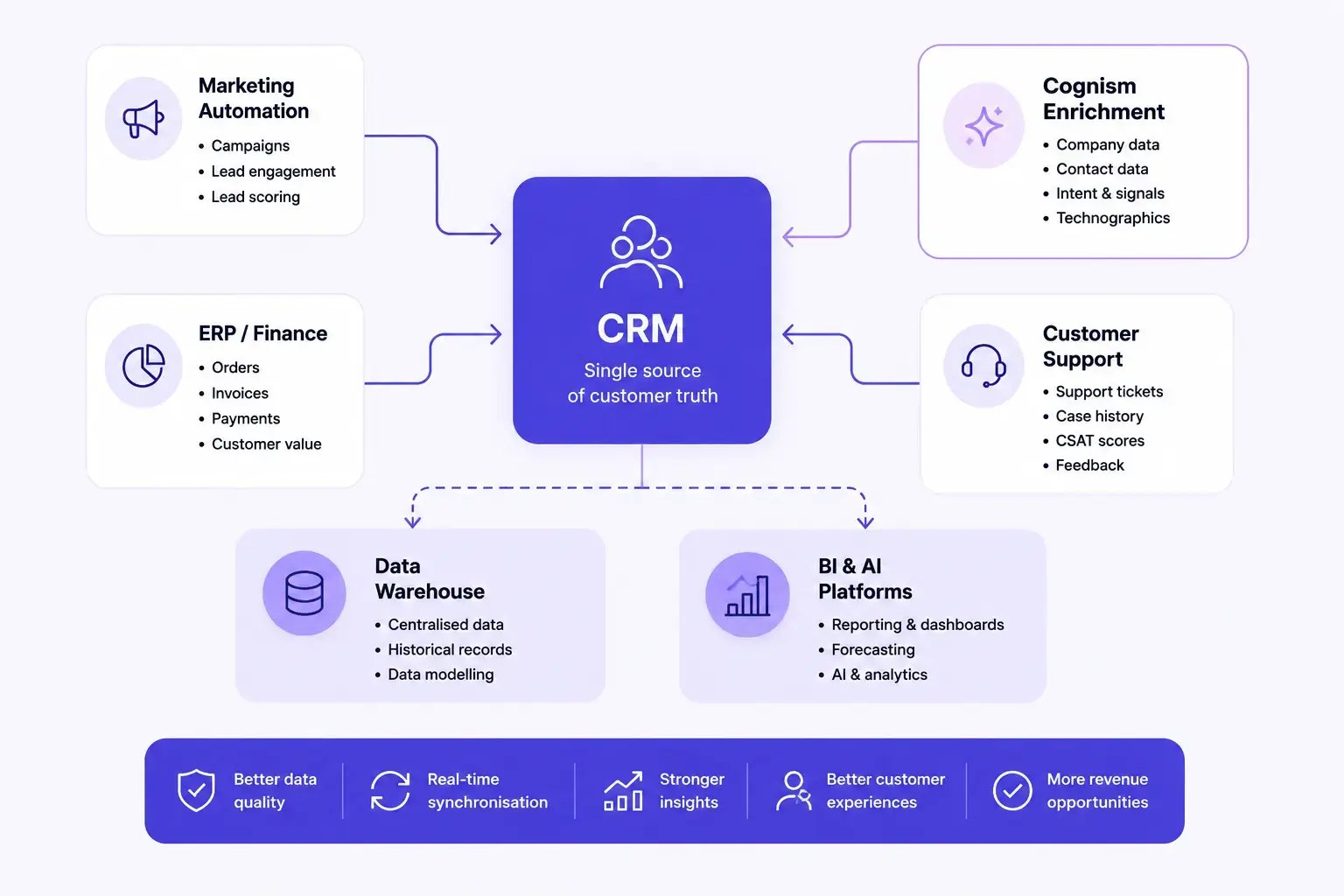
CRM data integration is the process of connecting your customer relationship management (CRM) platform with other business applications so data can be shared, synchronised and updated automatically.
Rather than storing customer information in isolated systems, integration creates a connected ecosystem where teams work from consistent, up-to-date information.
As information changes in one system, integrations ensure it can be reflected across the rest of your B2B technology stack, reducing manual updates and improving operational efficiency.
Benefits of CRM data integration
GTM teams rarely work from a single platform, and without integration, every department develops its own version of the truth.
The consequences may include:
- Duplicate customer records
- Inconsistent reporting
- Manual spreadsheet updates
- Poor lead routing
- Conflicting account ownership
- Slower customer response times
- Inaccurate forecasting
- Reduced confidence in AI recommendations
CRM data integration eliminates many of these challenges by creating a shared foundation of customer information across the business.
Rather than manually reconciling data from multiple systems, teams can spend more time generating revenue and less time correcting records.
Here are a few of the main benefits:
A single source of truth
One of the biggest advantages of customer data integration is creating a shared view of every customer.
Rather than relying on disconnected spreadsheets or departmental databases, every team works from the same trusted information.
This improves collaboration while reducing conflicting records across the business.
Better data consistency
One of the most common questions organisations ask is how CRM integration improves data consistency.
The answer lies in synchronisation.
When systems automatically exchange information, customer records remain aligned across your technology stack.
Instead of updating multiple platforms manually, changes made in one system can automatically be reflected elsewhere.
This reduces inconsistencies while supporting stronger data integrity across your organisation.
Improved productivity
Manual data entry remains one of the biggest sources of inefficiency within revenue teams.
CRM integration reduces administrative overhead by automatically synchronising customer information across connected platforms.
This gives SDRs, marketers and operations teams more time to focus on strategic work.
More reliable reporting
CRM integration improves reporting accuracy while providing a more complete picture of business performance.
This leads to better data insights and more confident decision-making.
Better customer experiences
Customers expect organisations to remember previous conversations regardless of which department they’re speaking to.
Integrated systems provide teams with complete customer context, helping create more personalised and consistent experiences throughout the customer lifecycle.
Stronger AI performance
When CRM information is fragmented across disconnected systems, AI recommendations become less reliable.
Integrated CRM data provides a stronger foundation for forecasting, lead scoring, customer segmentation and pipeline analysis.
Understanding CRM data integration in your revenue stack
GTM tech stacks have expanded over the past decade.
Most organisations now manage customer information across dozens of connected applications.
A typical B2B technology stack might include:
| Function | Example systems |
|---|---|
| CRM | Salesforce, HubSpot, Microsoft Dynamics, Zoho CRM |
| Marketing | HubSpot Marketing Hub, Marketo, Pardot |
| Sales engagement | Outreach, Salesloft |
| Customer support | Zendesk |
| ERP | NetSuite, SAP, Microsoft Dynamics 365 Finance |
| Business intelligence | Power BI, Tableau |
| Revenue intelligence | Gong, Clari |
| Data enrichment | Cognism |
| Intent data | Bombora |
Without integration, each platform stores slightly different versions of customer and company information.
As those differences grow, reporting becomes less reliable and operational complexity increases.
CRM data integration creates consistency across every stage of the customer lifecycle by ensuring information moves automatically between connected systems.
Common challenges in CRM data integration
Although the benefits are significant, many organisations encounter challenges when integrating multiple business systems.
Understanding these issues early makes it easier to design a scalable integration strategy.
Poor data quality
Connecting multiple systems doesn’t automatically improve the information they contain.
If inaccurate or incomplete records already exist, integration may simply replicate those issues elsewhere.
That’s why successful CRM integration should be supported by ongoing CRM database cleansing, data hygiene and data quality initiatives.
Duplicate records
Different systems often store the same customer in different ways.
Without effective matching rules, organisations risk creating duplicate accounts that affect reporting, ownership and customer experiences.
Strong customer data deduplication should form part of every integration strategy.
Inconsistent field mapping
Applications frequently use different field names and data structures.
For example:
- “Industry” in one system may become “Business Sector” in another.
- Country values may follow different formats.
- Revenue fields may use different currencies.
Careful field mapping ensures information remains consistent as it moves between systems.
Legacy technology
Older applications may lack modern APIs or native integrations.
In these situations, organisations often rely on middleware or specialist integration platforms to connect systems securely.
Security and compliance
Moving customer data between systems increases the importance of governance.
Integration strategies should include:
- Access controls
- Audit trails
- Encryption
- Data retention policies
- GDPR compliance
- Internal governance processes
Strong B2B data governance ensures customer information remains secure while supporting regulatory compliance.
Integration sprawl
As businesses adopt more applications, integration complexity increases.
Without clear ownership, organisations may end up maintaining dozens of disconnected integrations that are difficult to monitor and support.
Creating a long-term integration strategy helps reduce unnecessary complexity while improving scalability.
Ultimately, the goal isn’t to connect every application available. It’s to build a connected revenue ecosystem where information flows securely, consistently and accurately across the systems that matter most.

CRM data integration methods
There isn’t a single approach to CRM integration.
The right method depends on your tech stack, the volume of data you’re managing and how frequently information needs to be synchronised.
Most organisations use a combination of the following approaches.
Native CRM integrations
Many software providers offer pre-built integrations with leading CRM platforms.
These connectors make it easy to synchronise customer information without extensive development work.
Native integrations are often the fastest way to connect business systems while reducing implementation complexity.
CRM API integration
For organisations with more complex requirements, CRM API integration provides greater flexibility.
Application Programming Interfaces (APIs) allow developers to exchange information between platforms in real time.
APIs are commonly used to:
- Synchronise customer records
- Build custom workflows
- Connect internal applications
- Integrate proprietary systems
- Support AI applications
- Maintain data synchronisation across multiple platforms
Businesses with sophisticated revenue operations often combine native integrations with APIs to create a highly connected technology ecosystem.
Integration Platform as a Service (iPaaS)
As businesses adopt more software, managing dozens of direct integrations becomes increasingly difficult.
Integration Platform as a Service (iPaaS) solutions provide a central platform for connecting applications and managing data flows between them.
Rather than creating separate integrations for every application, iPaaS platforms simplify automation through reusable workflows and centralised monitoring.
ETL and data warehouse integration
Some organisations centralise customer information inside a data warehouse before distributing it across operational systems.
This approach is particularly useful for reporting, analytics and AI initiatives.
It also supports:
- Customer analytics
- Revenue reporting
- Forecasting
- Executive dashboards
- Machine learning
For organisations managing large volumes of information, combining CRM integration with warehouse synchronisation creates a more scalable data architecture.
Data-as-a-Service (DaaS)
Many businesses also integrate external data providers directly into their CRM.
Rather than relying solely on internal customer records, Data-as-a-Service platforms continuously provide trusted business information that enhances CRM records over time.
Examples include:
- Company information
- Contact information
- Firmographics
- Technographics
- Company hierarchies
- Buying signals
- Verified contact data
For GTM teams operating across multiple regions, DaaS provides an efficient way to maintain accurate customer information while reducing manual research.
Cognism is a provider who can assist enterprise teams with company data API integration and DaaS. Here's what one customer had to say:

VP of Sales @DinMo

Best CRM data integration platforms
The best integration platform depends on your existing technology stack, internal resources and long-term data strategy.
Some organisations need lightweight workflow automation, while others require enterprise-grade integration and continuous data synchronisation.
Here are some of the leading CRM data integration platforms to consider.
1. Cognism
Best for: GTM teams looking to integrate trusted B2B data directly into their CRM.
/(SEO)%20Product%20-%20Compressed/Enrich%20Stats-WEBP.webp?width=1080&height=870&name=Enrich%20Stats-WEBP.webp)
Cognism connects with leading CRM and sales engagement platforms to enrich customer and company records with trusted business data.
Its native integrations, APIs and Data-as-a-Service capabilities allow organisations to maintain more complete CRM records while reducing manual data management.
Alongside CRM Enrichment, Cognism helps teams improve account planning, lead routing and customer segmentation using continuously updated business intelligence.
Key features
- CRM Enrichment
- Salesforce integration
- HubSpot integration
- Microsoft Dynamics integration
- Pipedrive integration
- Salesloft integration
- Outreach integration
- API access
- Data-as-a-Service
- European B2B data
Considerations
Cognism is best suited to organisations looking to improve CRM data quality through trusted business data rather than workflow automation alone.
Pricing
Cognism’s pricing is structured across two primary packages:
- Standard provides access to Cognism’s core European contact and company dataset, including phone-verified mobile numbers and customer relationship management enrichment via CSV. It is designed for teams that require accurate, compliant data for day-to-day prospecting and account coverage. The plan includes an annual data allowance per user (10,000 credits), with the option to scale as requirements grow.
- Pro builds on Standard by combining Cognism’s dataset with advanced capabilities, including on-demand verification services, premium mobile coverage, company hierarchies, API access, and intent data. It includes 12,000 credits per user annually. This enables revenue teams to prioritise accounts more effectively, understand buying context and act with better timing across complex European markets.
Additional options, including user seats and CRM enrichment, can be added depending on prospecting needs and organisational scale.

Head of Sales @BearingPoint

2. MuleSoft
Best for: Enterprise CRM integration.
MuleSoft enables organisations to connect CRM platforms with hundreds of enterprise applications through APIs and reusable integrations.
Key features
- API management
- Enterprise integrations
- Data synchronisation
- Workflow automation
Considerations
Typically requires technical implementation and ongoing administration.
3. Zapier
Best for: Small and growing businesses.
Zapier connects thousands of business applications using simple workflow automation.
It’s commonly used to automate routine CRM updates without development resources.
Key features
- Workflow automation
- CRM integrations
- No-code automation
- Thousands of application connectors
Considerations
Complex enterprise integrations may require more advanced platforms.
4. Workato
Best for: Enterprise workflow automation.
Workato combines application integration with business process automation, helping organisations connect CRM, ERP, marketing and finance systems.
Key features
- Enterprise automation
- AI-powered workflows
- API integrations
- CRM connectivity
Considerations
Designed primarily for larger organisations with complex integration requirements.
5. Boomi
Best for: Large-scale system integration.
Boomi provides cloud-based integration for CRM, ERP and data management initiatives.
Key features
- Cloud integration
- API management
- Data synchronisation
- Master data management
Considerations
Implementation may require specialist expertise.
6. Celigo
Best for: ERP and CRM integration.
Celigo helps organisations connect CRM platforms with ERP, finance and e-commerce systems.
It’s particularly popular for NetSuite integrations.
Key features
- ERP integrations
- CRM synchronisation
- Workflow automation
- Data management
Considerations
Best suited to businesses with complex operational systems.
7. Tray.ai
Best for: AI-powered automation.
Tray.ai enables businesses to automate customer workflows using APIs and AI-powered integrations.
Key features
- AI automation
- API orchestration
- CRM connectivity
- Workflow builder
Considerations
Most valuable for organisations investing heavily in automation.
8. Stacksync
Best for: Real-time CRM synchronisation.
Stacksync focuses on keeping CRM information synchronised across operational databases and business applications.
Key features
- Two-way synchronisation
- Real-time updates
- CRM integrations
- Database connectivity
Considerations
Focused primarily on synchronisation rather than lead enrichment.
Which CRM integration platform is right for you?
Different organisations have different integration priorities.
If your goal is workflow automation, an iPaaS platform may be the best fit.
If you’re connecting enterprise systems such as CRM and ERP, a dedicated integration platform may offer greater scalability.
However, if your priority is maintaining the integrity of customer and company data, consider how your integration strategy supports ongoing enrichment, governance, and CRM health.
The strongest revenue organisations don’t simply move data between applications. They ensure every system is powered by accurate, connected and continuously updated information.
/CTAs%20(SEO)/Enrich%20CTA%20Banner.webp?width=2625&height=928&name=Enrich%20CTA%20Banner.webp)
CRM integration with leading business platforms
Most organisations don’t rely on a single CRM. They operate a broader revenue tech stack where information needs to flow securely between multiple systems.
Below are some of the most common CRM integration scenarios.
Salesforce CRM integration
Salesforce CRM integration allows organisations to connect Salesforce with marketing platforms, ERP systems, customer support software, data providers and analytics tools.
Common Salesforce integrations include:
- Marketing automation platforms
- ERP systems
- Customer support software
- Sales engagement platforms
- Business intelligence tools
- Data enrichment providers
- Intent data platforms
Many organisations also integrate Salesforce with trusted data providers to maintain more complete customer and company records while reducing manual administration.
HubSpot CRM integration
HubSpot has become a popular choice for growing revenue teams because of its broad ecosystem of integrations.
Common use cases include:
- Marketing automation
- Customer support
- Sales engagement
- Data enrichment
- Business intelligence
- Revenue reporting
Increasingly, organisations are also exploring HubSpot AI integration with existing CRM data to improve lead scoring, forecasting and customer insights.
Combined with HubSpot campaign data, CRM integration of connected customer data helps marketing and sales teams work from the same information throughout the customer lifecycle.
As businesses grow, HubSpot CRM modernisation and data integration initiatives often focus on improving reporting consistency while reducing manual processes.
Microsoft Dynamics CRM integration
Many enterprise organisations rely on Microsoft technologies throughout their business.
Microsoft CRM data integration and Microsoft Dynamics CRM data integration enable businesses to connect CRM data with:
- Microsoft 365
- Power BI
- Azure
- Dynamics ERP
- Finance systems
- Customer support applications
This creates stronger visibility across commercial and operational functions while supporting more accurate reporting.
Zoho CRM integration
Zoho offers a broad suite of business applications, making integration particularly valuable for organisations already operating within its ecosystem.
Common scenarios include:
- Marketing integration
- Customer support
- Finance
- Analytics
- Workflow automation
Many businesses also explore Zoho CRM modernisation and data integration alongside Zoho data warehouse integration with CRM to improve reporting and centralise customer information.
Zendesk CRM integration
Customer support data plays an important role throughout the customer lifecycle.
A Zendesk CRM integration allows sales and customer success teams to access valuable support context before engaging customers.
Examples include:
- Open support tickets
- Customer satisfaction scores
- Product issues
- Service history
- Renewal risk indicators
Connecting support and CRM data helps create more informed customer conversations.
How to fix integration issues with CRM data
Even well-designed integrations require ongoing maintenance.
As systems evolve, data structures change, and businesses adopt new applications, integration challenges can emerge.
If you’re wondering how to fix integration issues with CRM data, start by focusing on the underlying quality of your customer information.
Audit your integrations
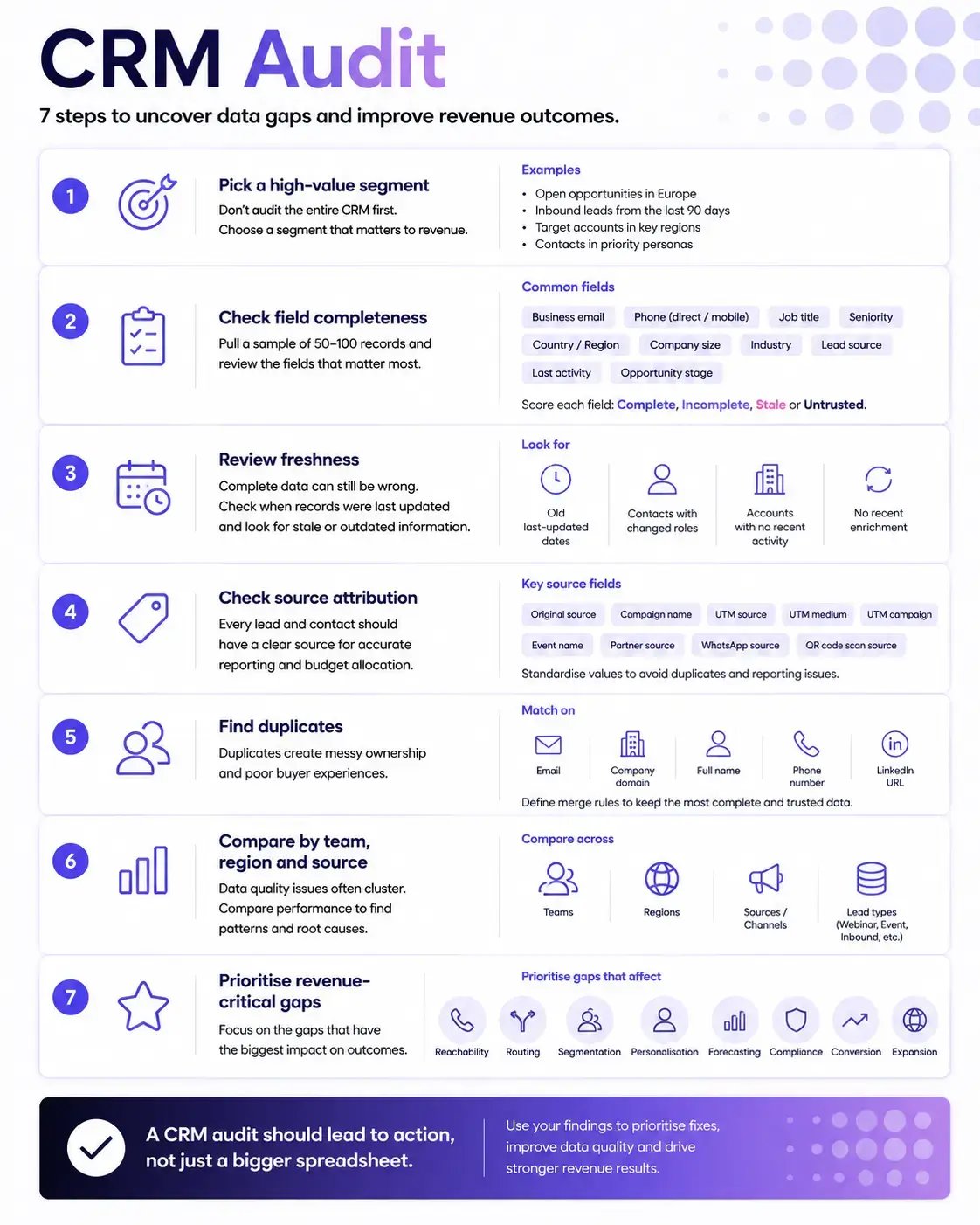
Review every connected system and identify:
- Duplicate integrations
- Unused workflows
- Broken connections
- Outdated APIs
- Manual workarounds
Many businesses discover they’re maintaining multiple integrations that perform similar functions.
Standardise your data model
Consistent field definitions improve synchronisation across platforms.
Establish shared standards for:
- Customer names
- Company information
- Countries
- Industries
- Lifecycle stages
- Revenue bands
- Territories
A common data model reduces conflicts as information moves between systems.
Improve data quality before synchronisation
Poor-quality data spreads quickly.
Before connecting additional systems, address:
- Duplicate records
- Missing information
- Outdated company data
- Invalid email addresses
- Inconsistent formatting
Supporting initiatives such as CRM database cleansing, customer data deduplication, and data hygiene helps create a stronger foundation for successful integration.
Monitor integration performance
Successful CRM integration isn’t a “set and forget” project.
Regularly monitor:
- Synchronisation failures
- API performance
- Match rates
- Duplicate creation
- Data freshness
- Field coverage
These metrics help identify issues before they affect business operations.
Combine integration with enrichment
Integration ensures systems stay connected.
Enrichment ensures the information flowing through those systems remains valuable.
Many organisations now combine CRM integration with continuous enrichment to maintain accurate company and customer records across every connected platform.
This creates a stronger foundation for sales, marketing, RevOps and AI initiatives.

Digital Marketing Manager @Sparta Global
Build a connected revenue data foundation with Cognism
Connecting systems is only part of the challenge.
The quality of the data flowing between those systems ultimately determines how effective your CRM, reporting and AI initiatives become.
Cognism helps GTM teams strengthen their CRM data foundation by combining native integrations, Data-as-a-Service, APIs and continuous CRM Enrichment.
Whether you’re using Salesforce, HubSpot, Microsoft Dynamics, Pipedrive or another leading CRM, Cognism integrates seamlessly with your existing revenue stack to deliver trusted company and contact data where your teams already work.
With continuously refreshed European B2B data, flexible APIs and CRM enrichment workflows, Cognism helps organisations improve lead routing, strengthen account planning, support AI initiatives and maintain healthier customer records over time.
For businesses with more complex data requirements, Cognism’s Data-as-a-Service (DaaS) provides a scalable way to deliver trusted business data across multiple systems, while its APIs support custom integration workflows and enterprise data strategies.
The result is more than a connected CRM. It’s a connected revenue ecosystem powered by accurate, governed and continuously updated data.
Ready to improve your CRM data integration strategy?
Book a demo to see how Cognism’s CRM Enrichment, DaaS and integrations help you build a trusted revenue data foundation across your entire GTM stack.
/CTAs%20(SEO)/daas-cta.webp?width=1500&height=530&name=daas-cta.webp)
Frequently asked questions