A CRM database should be a revenue organisation’s most valuable commercial asset.
But data changes quickly, and according to Cleanlist, B2B data decays at around 22.5% per year, meaning almost a quarter of a database can become outdated within 12 months without regular maintenance.
For high-velocity sectors such as SaaS, fintech and professional services, decay can be even faster.
In this guide, we’ll explain how to build, manage, clean and enrich your CRM data for more reliable revenue execution.
What is a CRM database?
A CRM database is a structured collection of customer and prospect data used by businesses to manage relationships, track activity, and improve sales, marketing and customer service.
So, what does CRM stand for?
CRM stands for customer relationship management. In practice, it refers to the system organisations use to manage customer relationships through data.
A CRM customer database usually includes information such as:
- Contact names
- Job titles
- Email addresses
- Phone numbers
- Company names
- Company size
- Industry
- Location
- Deal stage
- Lead source
- Website activity
- Email engagement
- Sales calls
- Support tickets
- Purchase history
- Renewal dates
- Marketing preferences
For revenue teams, CRM data helps answer questions such as:
- Who are our prospects?
- Which accounts are in active pipeline?
- Who last spoke to this customer?
- What has this company bought before?
- Which leads match our ICP?
- Which records are missing key information?
- Which contacts need to be cleaned, updated or enriched?
A CRM is only valuable when the data inside it is accurate, complete, consistent and easy for teams to use.
CRM vs database: What’s the difference?
The difference between a CRM and a database comes down to purpose:
-
A database stores and organises data.
-
A CRM uses customer and prospect data to help teams manage relationships, workflows and revenue activity.
Does that make a CRM a database?
Good question! A CRM includes a database, but it does more than store information. It also helps teams manage sales pipelines, track customer activity, automate tasks, segment audiences, report on performance, and collaborate across departments.
Think of it this way:
- A database stores information.
- A CRM database stores customer and prospect information.
- A CRM system helps teams act on that information.
For example, a standard B2B contact database might hold a table of contacts with names, email addresses and company names.
A CRM database system goes further by indicating whether each contact is a lead, an opportunity, a customer, or a churn risk. It can also show previous calls, emails, meetings, support tickets, campaign activity and next steps.
A general database can store many types of data, such as product inventory, financial transactions, website logs or employee records.
CRM database software is designed specifically for customer relationship management.
The relationship between CRM and database tools matters because many organisations use both.
A business might use Salesforce as its CRM, Snowflake as its data warehouse and Cognism to enrich CRM records with accurate B2B contact and company data.
Revenue teams shouldn’t need to choose between a CRM and a database.
The priority should be ensuring customer data flows cleanly across sales, marketing, analytics, and operations, so every team can work from accurate, consistent, and usable information.
What are some CRM database examples?
CRM databases can range from simple Excel spreadsheets to advanced cloud CRM systems.
The right option depends on your organisation’s size, the complexity of your revenue operations, and the amount of customer data that needs to be managed across teams.
Here are some common examples of CRM databases and CRM database software.
1. Salesforce CRM database
Salesforce is one of the most widely used CRM database systems for revenue teams.
It helps organisations manage leads, contacts, accounts, opportunities, campaigns, tasks and customer interactions.
-
B2B sales teams can use Salesforce to track deals, log calls, assign follow-ups and manage pipeline.
-
Marketing teams can use it to segment audiences and measure the influence of campaigns.
-
Customer success teams can use it to monitor renewals, account health and expansion opportunities.
For enterprise organisations, Salesforce often sits at the centre of a revenue technology stack.
2. HubSpot CRM database
HubSpot is commonly used as a shared CRM database across sales, marketing and customer service.
The HubSpot CRM gives teams a single view of contacts, companies, deals, tickets, lists, campaigns, and engagement activity. This helps reduce reliance on separate spreadsheets or disconnected tools.
For growing revenue teams, HubSpot can support pipeline management, marketing automation, customer service, and reporting from a single system.
3. Microsoft Dynamics CRM database
Microsoft Dynamics is often used by larger or more complex organisations that want CRM capabilities integrated with Microsoft’s broader business ecosystem.
The Microsoft Dynamics CRM can support sales, marketing, customer service and operations use cases, depending on how it is configured.
It is often chosen by organisations that already rely on Microsoft tools and need CRM data connected to wider business processes.
4. Zoho CRM database
Zohi is often used by smaller or mid-sized teams that need a flexible CRM database to manage leads, contacts, deals, and activities.
Teams using Zoho may export, organise or manage CRM data for reporting and operational purposes.
As with any CRM, B2B contact data should always be handled in line with privacy laws, consent requirements and platform permissions.
5. Access or spreadsheet-based CRM database
Some businesses still use Microsoft Access, Excel or Google Sheets as a basic CRM customer database.
This can work for very small teams with limited data and simple processes. However, spreadsheet-based systems quickly become difficult to maintain as data volume, team size and reporting needs grow.
They often lack the governance, automation, B2B data integrations, and auditability required for more mature revenue operations.
6. Prospect database in CRM
A CRM prospect database stores information about potential customers.
It may include target accounts, decision-makers, buying committees, contact details, firmographics, technographics, intent signals and outreach history.
Sales and marketing teams use this data to segment audiences, route leads, prioritise accounts and personalise engagement before a deal is won.
For B2B revenue teams, this is where CRM database enrichment becomes especially important.
Accurate and complete prospect data gives teams a clearer view of market opportunity and helps them focus on the accounts most likely to convert.
7. Customer database CRM
A customer database CRM stores information about companies and contacts that already have a commercial relationship with your organisation.
This may include contracts, renewals, product usage, support tickets, expansion opportunities, stakeholder relationships and customer health signals.
Customer success, account management, and retention teams use this data to manage relationships, identify risks, uncover expansion opportunities, and improve the customer experience after the initial sale.
CRM database management: 8 steps
According to Salesforce research, enterprise CIOs will allocate 25% of their budget to data infrastructure and management this year. Managing your CRM’s data is increasingly essential, particularly in this new age of AI agents.
A well-managed CRM should support segmentation, routing, forecasting, reporting, customer engagement and revenue execution. When data is duplicated, incomplete or outdated, the CRM becomes harder to trust and less useful for commercial decision-making.
Understanding why CRM data decays is one part of the problem. Building a systematic process to manage that decay is where revenue teams protect performance.
Here are eight steps to manage CRM database quality.
1. Define your CRM database structure
Your CRM structure should reflect how your organisation sells, markets and supports customers.
Before importing or enriching data, define the core objects and fields your teams need.
Common objects include:
- Leads
- Contacts
- Accounts
- Opportunities
- Campaigns
- Tasks
- Activities
- Tickets
- Users
These objects represent the people, companies, deals and interactions that make up your customer relationships.
Then decide which fields matter most. For a B2B revenue team, this may include:
-
Job title
-
Seniority
-
Department
-
Company size
-
Industry
-
Region
-
Direct dial
-
Email
-
LinkedIn URL
-
Lifecycle stage
-
ICP fit
Clear CRM database design helps prevent messy data later. It also provides sales, marketing, RevOps, and customer success with a shared structure for using customer and prospect data consistently.
2. Create a golden record
A golden record is the authoritative version of a contact, account or deal in your CRM.
This means each record has one trusted version of the truth, with no duplicates, conflicting fields or competing records across systems. It becomes the foundation for reporting, routing, segmentation and forecasting.
To create a golden record, define clear data ownership rules:
- Which system holds the master record
- Which fields take priority when sources conflict
- Who owns each field
- Who resolves discrepancies
- When records should be merged, archived or updated
Without these rules, data quality issues continue to reappear, even after a clean-up project.
A useful first step is to audit your CRM for duplicate contact and account records. Many revenue organisations discover that a significant portion of their reporting is affected by duplicate, incomplete or conflicting data.
3. Set data entry rules
Poor CRM database quality often starts at the point of entry.
If B2B marketing and sales teams enter information in different formats, reporting becomes harder, segmentation breaks, and automation becomes less reliable.
Create rules for how data should be entered. For example:
- Use standard country names.
- Use consistent job function values.
- Avoid free-text fields where picklists are more reliable.
- Define required fields for lead creation.
- Use validation rules for email addresses and phone numbers.
- Set naming conventions for accounts, campaigns and territories.
This is especially important across sales and marketing. One team might enter “VP Sales”, while another uses “Head of Sales”. Over time, these inconsistencies weaken segmentation, personalisation and reporting.
A field-by-field audit can help identify where different teams are populating CRM data inconsistently. These inconsistencies are often the source of reporting blind spots and workflow errors.
4. Remove duplicates and clean your CRM regularly
Duplicate records create confusion. One sales rep may update one contact, while another works from a different version of the same person. This leads to poor customer experience, inaccurate reporting and wasted effort.
Use your CRM’s deduplication tools or CRM data cleansing solutions to identify duplicate leads, contacts and accounts.
Regular CRM database cleaning should also account for natural data decay. B2B data changes constantly:
- People change jobs
- Companies merge
- Departments restructure
- Phone numbers change
- Email addresses become invalid
- Job titles are updated
- Companies open or close offices
Cleanlist reports that B2B contact data decays by around 2.1% per month, compounding to approximately 22.5% per year across the average B2B database.
CRM database cleansing may include:
- Removing invalid email addresses
- Updating outdated job titles
- Reassigning contacts who have changed companies
- Standardising company names
- Fixing formatting errors
- Merging duplicate accounts
- Archiving inactive records
- Enriching missing fields
- Checking phone numbers
- Refreshing priority accounts
For larger CRM environments, some companies use CRM database cleansing services, CRM database quality consultants or CRM database cleanup consultants.
Others use enrichment and data hygiene tools to automate parts of the process.
Cognism is a great example of software that can help ensure your data remains clean, compliant, and up to date.
Sparta Global used Cognism to enrich its CRM data. They shared how Cognism helped them save time and increase open rates:

Digital Marketing Manager @Sparta Global

5. Automate the cleansing cycle
Manual CRM maintenance does not scale across a large revenue organisation.
Reps enter information inconsistently, skip optional fields under pressure and use different naming conventions. This is a structural issue, so the solution needs to be systematic.
Automated CRM database management can help by:
- Running scheduled deduplication checks
- Setting validation rules at field level
- Triggering alerts when records fall below completeness thresholds
- Routing incomplete records to enrichment workflows
- Standardising fields automatically
- Refreshing priority account and contact data on a set cadence
A useful approach is to assign a data health score to each account or contact record. This score can measure completeness across key fields such as email, phone number, job title, company size, industry and lifecycle stage.
Here’s an example of what it might look like:
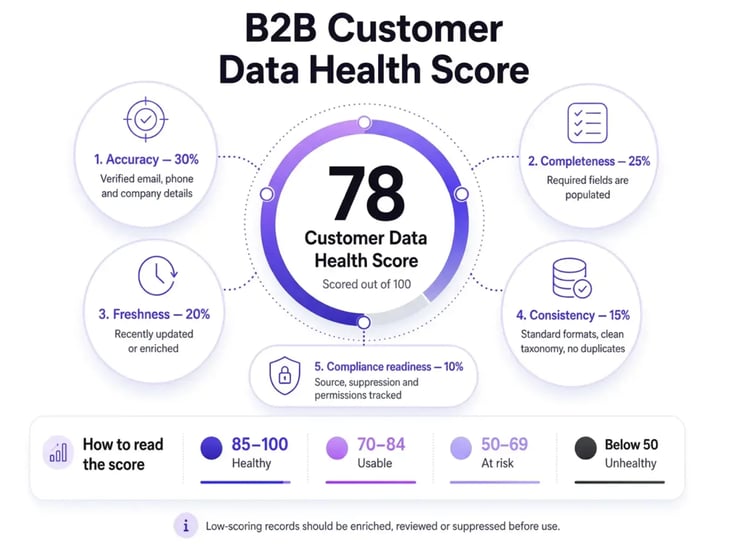
Records that fall below the required threshold can then be sent automatically to an enrichment workflow, rather than waiting for a rep to notice missing information.
6. Enrich CRM database records
When you collect new data about a potential client, checking its quality should be part of the process from the start, especially when that data comes through consented channels such as landing page forms.
Most CRMs behave like static databases. Data enters the system, remains there until someone manually updates it, and, over time, decays.
Enrichment is especially valuable at the point of lead capture. Instead of allowing incomplete leads into the CRM and waiting for manual updates later, enrichment can occur as soon as a prospect fills out a form or enters the pipeline.
Real-time enrichment can append:
- Verified contact details
- Firmographic data
- Technographic data
- Company size
- Industry
- Location
- Seniority
- Department
- Buying committee context
This improves routing, scoring, segmentation and speed to follow-up.
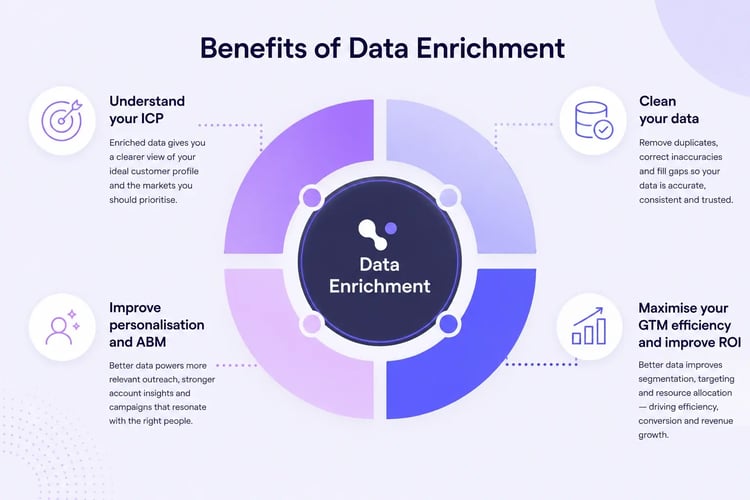
Cognism acts as a dynamic enrichment layer for your CRM. It helps validate and refresh contact and account data, replacing stale or incomplete records with accurate, compliant B2B sales intelligence.
The result is a CRM that better reflects the current market and provides revenue teams with a stronger foundation for identifying, prioritising, and acting on commercial opportunities.
For example, you may have a lead’s name and email address, but no phone number, seniority, department, company size, industry or region. CRM database enrichment fills those gaps and keeps records more useful over time.

SDR Manager EMEA @Druva

7. Control governance and monitor data quality metrics
CRM database quality depends on both governance and accuracy.
You need to decide who can create, edit, export and delete CRM records. Set permissions by role so users have the access they need without creating unnecessary risk.
Good B2B data governance should define:
- Who owns each CRM object and field
- Who can update sensitive data
- Which records can be exported
- How consent and compliance requirements are handled
- How data changes are audited
- How inactive or outdated records are managed
This is particularly important for teams handling customer and prospect data across regions, given the varying privacy and data protection requirements.
You should also monitor the quality of your CRM database over time. Useful metrics include:
- Email bounce rate
- Duplicate rate
- Field completion rate
- Records updated in the last 90 days
- Records missing phone numbers
- Contacts with no account
- Stale opportunities
- Contacts without a valid job title
- Match rate from enrichment jobs
- Phone connect rate
Data quality includes accuracy, completeness, consistency, timeliness and relevance. The strongest data quality solutions support all five. They help ensure records are current, usable and aligned with the workflows that drive revenue execution.
8. Consider implementing a DaaS solution
For larger organisations, Data-as-a-Service can offer a more scalable approach to managing CRM data quality.
DaaS gives revenue teams access to accurate, structured B2B data that can be delivered directly into the systems and workflows they already use. Instead of relying on manual updates or one-off data imports, teams can receive refreshed data through APIs, flat files or scheduled delivery.
Cognism’s DaaS gives organisations the flexibility to receive B2B data in the format and frequency that best suits their operating model. This is particularly useful for enterprise teams managing large CRM environments, multiple systems or complex regional data requirements.
With Cognism DaaS, teams can access:
-
Flexible delivery: real-time enrichment or scheduled batch updates via Snowflake, S3, Google Cloud, Databricks or SFTP.
-
Data quality and compliance: audit-ready metadata and consent trails designed to support GDPR, CCPA and PECR requirements.
-
Ongoing value: ROI benchmarking, usage health checks and tailored recommendations to help teams improve data quality over time.
For enterprise revenue organisations, DaaS makes CRM data management more consistent and scalable. It helps teams maintain cleaner data, reduce manual work, and strengthen the data foundation for segmentation, forecasting, AI workflows, and GTM execution.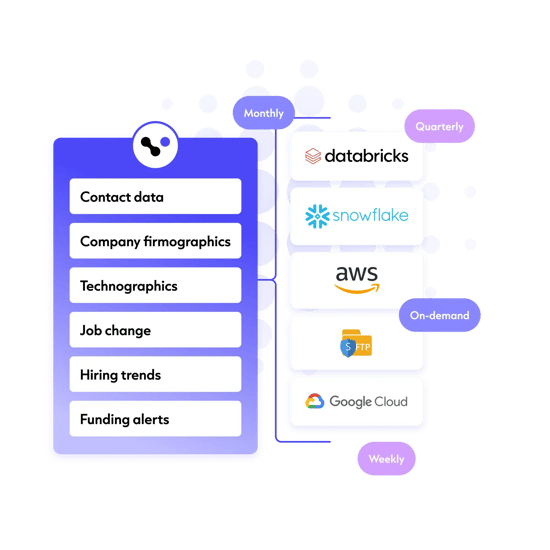
How to build a CRM database
If you’re wondering how to build a CRM database, start with strategy before software.
The best CRM database is the one your team can use, trust and maintain. It should reflect how your organisation sells, markets and supports customers, while giving every revenue team access to accurate, consistent and usable sales data.
Here’s how to create a CRM database step by step.
1. Define your goal
Before building a CRM database, decide what the system needs to do.
- Are you creating a customer database for account management, renewals and customer success?
-
Are you building a prospect database for outbound sales and market expansion?
-
Are you replacing spreadsheets with CRM database software?
-
Or are you creating a shared view of accounts, contacts and pipeline across sales, marketing and customer success?
Your goal will shape the CRM database model, fields, integrations, governance and reporting setup.
2. Choose your CRM database software
Next, choose the best CRM database software for your needs.
Popular CRM database systems include Salesforce, HubSpot, Microsoft Dynamics, Zoho and Pipedrive. The right choice depends on company size, budget, complexity, integrations and how your teams work.
When comparing CRM database software reviews, look for:
- Ease of use
- Integrations
- Reporting
- Data quality controls
- Automation
- Security
- Scalability
- Custom fields
- Workflow management
- API access
- CRM database enrichment options
For larger businesses, the best solution may involve a CRM, a data warehouse, an enrichment provider, and integration tools.
3. Design your CRM database model
Your CRM database model defines how records relate to one another.
For example:
-
Accounts represent companies
-
Contacts represent people at those companies
-
Leads represent potential buyers who are not yet qualified
-
Opportunities represent potential revenue
-
Activities represent calls, emails, meetings and tasks
-
Campaigns represent marketing initiatives
A clear CRM database structure helps teams understand what data belongs where.
4. Decide what data to collect
Do not collect every field just because you can.
Focus on data that helps your team act:
-
For sales, that may include B2B direct dials, emails, seniority, department and buying role.
-
For marketing, it may include industry, region, company size, lifecycle stage and campaign source.
-
For customer success, this may include the renewal date, product usage, contract value, and support history.
5. Import existing data
You may already have data in spreadsheets, legacy modernisation tools, email platforms, event lists, finance systems, or an old CRM database.
Before importing, check your data hygiene. If your data is poor. It’s time to clean it:
-
Remove duplicates
-
Standardise formatting
-
Check required fields
-
Remove outdated records
-
Validate emails
-
Map fields correctly
-
Confirm consent and compliance requirements
6. Connect your CRM with database and business tools
To connect CRM with database tools, use native integrations, APIs, middleware or data platforms.
Common integrations include:
- CRM to marketing automation
- CRM to sales engagement
- CRM to customer support
- CRM to billing
- CRM to data warehouse
- CRM to enrichment provider
- CRM to business intelligence tools
Cognism integrates directly with leading CRM and revenue platforms, including Salesforce, HubSpot, Pipedrive, Microsoft Dynamics, Outreach and Salesloft.
These integrations help teams move accurate B2B data into the systems they already use. For example, the Cognism HubSpot integration allows revenue teams to push verified contact data, including phone numbers, email addresses, and firmographic details, directly into HubSpot records without manual data entry.
The same principle applies across Salesforce and other connected platforms, helping teams enrich records, reduce manual admin and maintain cleaner CRM data.
/(SEO)%20Product%20-%20Compressed/sales-companion-integrations-webp.webp?width=654&height=550&name=sales-companion-integrations-webp.webp)
7. Train your team
Once your CRM management strategy is in place, train your team on how data management should work in their day-to-day roles.
A CRM database manager, RevOps owner or operations lead should explain how teams should use CRM fields, views, reports and workflows. This helps prevent bad habits from becoming embedded and provides sales, marketing, and customer success with a shared understanding of CRM data quality.
Training should cover:
- What each field means
- When to create a lead versus a contact
- How to log activities
- How to update deal stages
- How to flag bad data
- How to request new fields
- How to maintain CRM database quality
Data management training should also be part of onboarding. New hires should understand from the start how CRM data is entered, maintained and used across the revenue organisation.
Even the best CRM software will fail if users don’t trust it or understand how to use it. Training turns CRM data quality from an operations task into a shared commercial discipline.
8. Maintain and improve the database
Building a CRM database is not a one-time project.
Set a regular schedule for CRM database cleansing, enrichment and governance. For example:
-
Weekly duplicate checks
-
Monthly field completion reviews
-
Quarterly CRM database cleansing
-
Real-time enrichment for inbound leads
-
Scheduled enrichment for priority accounts
-
Annual CRM database design review
This helps you move from reactive CRM database cleanup to proactive CRM database management.
Best tools for exporting a database to your CRM
The best tools for exporting a database to CRM systems depend on your data source, CRM, budget and use case.
Some tools move records from one system to another. Others clean, enrich, verify or govern those records before they enter your CRM.
Here are four B2B tools that specialise in maintaining a CRM client database:
1. Cognism
Cognism is a strong choice for B2B revenue teams that want to export accurate, compliant prospect and customer data into their CRM.
It helps teams enrich CRM database records, fill missing fields and improve CRM database quality with high-quality B2B data. Cognism supports workflows across Salesforce, HubSpot, Pipedrive, Microsoft Dynamics and other revenue tools.
Cognism is especially useful if your CRM database needs:
- Verified B2B contact data
- Phone-verified mobile numbers
- Business emails
- Firmographic data
- Senior decision-maker coverage
- CRM enrichment
- Salesforce enrichment
- HubSpot enrichment
- Microsoft Dynamics enrichment
- Compliance-conscious prospecting data
- Scheduled or instant enrichment
Cognism’s Salesforce enrichment functionality allows users to update leads, contacts and accounts with Cognism data on demand or through scheduled enrichment jobs. This helps teams keep CRM records cleaner, more complete and more current without relying on manual updates.
For organisations operating across Europe and the UK, Cognism’s compliance-first approach is particularly important. It is built for revenue teams that need accurate B2B data while managing GDPR, CCPA and Do Not Call list requirements across global markets.
Cognism’s verified data also gives teams access to human-verified mobile numbers. For enterprise GTM teams, this improves the reliability of contact data and supports more confident revenue execution.

Global Head of Revenue Operations @ComplyAdvantage

2. ZoomInfo
ZoomInfo is often used by enterprise teams that need access to a large B2B contact database.
Its main strength is scale. It can support broad account-based marketing programmes, prospecting workflows and CRM enrichment across large addressable markets.
However, teams should assess how ZoomInfo data is verified, refreshed and governed before exporting it into CRM systems. High-volume data can create CRM quality issues if records are incomplete, duplicated or outdated.
For teams using ZoomInfo, additional cleansing, validation and enrichment workflows may be needed to maintain CRM health over time.
See how ZoomInfo compares to Cognism.
3. Apollo.io
Apollo.io combines contact data, B2B prospecting, sequencing and basic CRM functionality in one platform.
It can be useful for early-stage or smaller teams that want a more affordable way to build CRM database lists, run outbound sequences and manage simple prospecting workflows.
For larger organisations, the main considerations are data depth, governance and compliance coverage. As teams scale into more complex regions or regulated markets, they may need stronger data quality controls and more specialised CRM enrichment infrastructure.
See how Apollo.io compares to Cognism.
4. Lusha
Lusha is often used by individual contributors who need quick access to contact details.
It can support fast contact lookups, browser-based research and basic CRM enrichment. This makes it practical for one-off prospecting or smaller team workflows.
For enterprise revenue teams, Lusha may be less suitable as a strategic CRM enrichment layer. Larger organisations typically need deeper governance, stronger compliance controls, broader data coverage and scalable enrichment workflows across multiple systems.
See how Lusha compares to Cognism.
FAQ
The best database for your CRM
The best database for your CRM is not the one with the most records. It is the one with the most accurate, useful and actionable data.
A large CRM database creates little value if records are outdated, duplicated or missing critical fields. Revenue teams need data they can trust for segmentation, routing, prioritisation, forecasting and customer engagement.
That is where Cognism helps.
Cognism enables B2B sales, marketing and RevOps teams to enrich their CRM with accurate, compliant contact and company data. It helps fill missing fields, update outdated records, improve segmentation and give teams the information they need to identify and engage the right buyers.
For organisations using Salesforce, HubSpot, Microsoft Dynamics, Pipedrive and other CRM systems, Cognism provides the data foundation needed to improve CRM quality and support more consistent revenue execution.
If your CRM contains missing phone numbers, outdated job titles, incomplete accounts or stale prospect records, Cognism helps you improve data quality and keep records current over time.
/CTAs%20(SEO)/Verified-contact-data-cta-webp.webp?width=2625&height=928&name=Verified-contact-data-cta-webp.webp)